
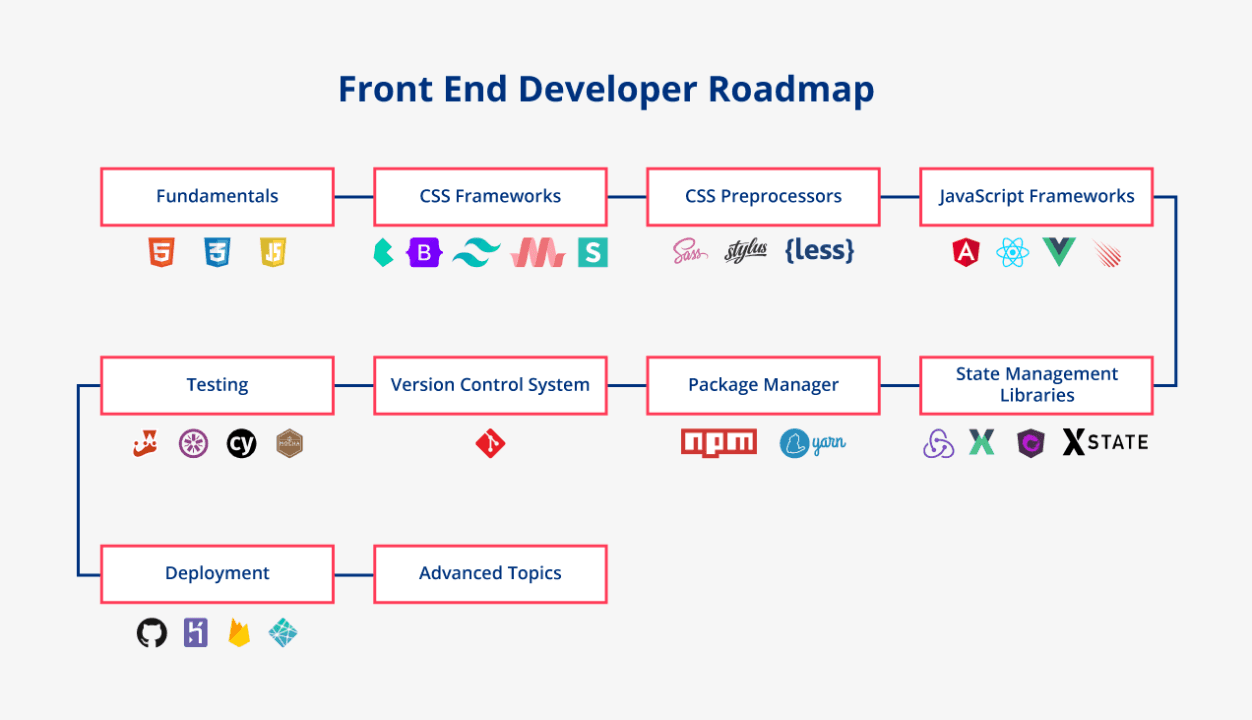
If you are considering a career in frontend development, you might be overwhelmed by the vast array of tools, languages, and frameworks available. This guide will help you navigate through the essential skills and knowledge areas you need to become a proficient frontend developer. Follow this step-by-step roadmap to build a solid foundation and advance your career in web development.
1. Understand the Basics of the Web
Before diving into coding, it is essential to understand how the web works. Familiarize yourself with the following concepts:
- What is the Internet?
- How do browsers work?
- What is HTTP/HTTPS?
- What are DNS and domain names?
2. Learn HTML (HyperText Markup Language)
HTML is the backbone of any web page. It structures the content on the web. Start by learning the basic elements and attributes.
Key Topics:
- Basic HTML structure
- Common HTML tags (headings, paragraphs, lists, links, images, etc.)
- Forms and input types
- Semantic HTML
Resources:
3. Master CSS (Cascading Style Sheets)
CSS is used to style HTML elements. It controls the layout, colors, fonts, and overall appearance of a web page.
Key Topics:
- CSS syntax and selectors
- Box model (margin, border, padding, content)
- Flexbox and Grid layout
- Responsive design (media queries)
- CSS variables and animations
Resources:
4. Get Comfortable with JavaScript
JavaScript is the programming language of the web. It allows you to create interactive and dynamic web pages.
Key Topics:
- Basic syntax and data types
- Functions and events
- DOM (Document Object Model) manipulation
- ES6+ features (let/const, arrow functions, promises, async/await)
- JSON (JavaScript Object Notation)
Resources:
- Mozilla Developer Network (MDN) - JavaScript
5. Learn Version Control with Git
Version control is crucial for tracking changes and collaborating with others. Git is the most widely used version control system.
Key Topics:
- Basic Git commands (clone, commit, push, pull, branch, merge)
- Using GitHub to host repositories
Resources:
6. Familiarize Yourself with Development Tools
These tools will help you write, debug, and test your code more efficiently.
Key Tools:
- **Code Editor**: Visual Studio Code, Sublime Text, Atom
- **Browser DevTools**: Inspect and debug web pages
- **Package Managers**: npm, Yarn
7. Build Projects
Applying what you've learned by building projects is crucial. Start with small projects and gradually increase their complexity.
Project Ideas:
- Personal portfolio website
- Simple to-do list app
- Weather app using a public API
8. Learn a Frontend Framework/Library
Once you are comfortable with the basics, learn a popular frontend framework or library to enhance your skills.
Popular Choices:
- **React**: A JavaScript library for building user interfaces
- **Vue.js**: A progressive JavaScript framework
- **Angular**: A platform for building mobile and desktop web applications
Resources:
9. Understand CSS Preprocessors and Frameworks
CSS preprocessors and frameworks can help you write cleaner and more manageable CSS.
Popular Choices:
- **Sass**: A CSS preprocessor that adds features like variables and nested rules
- **Bootstrap**: A CSS framework that provides pre-styled components
Resources:
10. Explore Build Tools and Task Runners
Build tools and task runners automate common development tasks.
Popular Choices:
- **Webpack**: A module bundler
- **Gulp**: A task runner
- **Parcel**: A web application bundler
Resources:
11. Learn about Testing
Testing ensures that your code is reliable and bug-free.
Key Types of Testing:
- Unit testing
- Integration testing
- End-to-end testing
Popular Tools:
- **Jest**: A JavaScript testing framework
- **Cypress**: An end-to-end testing framework
Resources:
12. Stay Updated and Keep Learning
Web development is a rapidly evolving field. Stay updated with the latest trends and continuously improve your skills.
Tips:
- Follow industry blogs and websites (e.g., Smashing Magazine, CSS-Tricks)
- Join communities (e.g., Stack Overflow, Reddit, Dev.to)
- Attend webinars and conferences
Conclusion
Becoming a proficient frontend developer requires dedication, practice, and continuous learning. Follow this roadmap, build projects, and don't be afraid to experiment and make mistakes. With time and effort, you'll be able to create beautiful, responsive, and dynamic web applications. Happy coding!